139Yun
Please read the following notes carefully
This interface is a reverse-engineered interface based on legacy products. The project team will not actively maintain it. Please do not submit any issues regarding fixes or further reverse engineering requests for this driver.
请仔细阅读注意事项
本接口是基于历史产物的逆向接口,项目组不会主动进行维护,请勿针对此驱动提出有关于任何修复或进行进一步逆向行为需求的issue。
Cloud disk address: https://yun.139.com/
云盘地址:https://yun.139.com/
WARNING
The OpenList version must be greater than v3.41.0 to use this tutorial.
WARNING
OpenList 版本必须大于 v4.2.4 才能使用本教程。
TIP
Most parameters can be obtained from browser DevTools. See Search keywords.
TIP
大部分参数可通过浏览器开发者工具获取。请参考搜索关键词。
Quick start
快速开始
For long-term use, use the new personal cloud with password login fallback. This lets OpenList persist the generated Authorization and renew it automatically when possible.
- Log in to https://mail.10086.cn/ in your browser.
- Copy cookies from
mail.10086.cnand paste them intoMailCookiesas a Cookie Header String, for examplekey1=value1; key2=value2. Do not paste JSON, a table, or one cookie per line. - Fill your 139 email/mobile account in
Username, and fill the corresponding password inPassword. - Add a
139Yunstorage in OpenList and fill:Type:personal_newMailCookies: the cookies copied in step 2Username: your accountPassword: your passwordRoot folder ID: leave empty or fill/for the root directory
- Leave
Authorization,Cloud ID, andUserDomainIDempty. - Save the storage.
If you only want to mount quickly, you can fill only Authorization: log in to https://yun.139.com/, find a hcy/file/list request in DevTools -> Network, copy the request header Authorization, and paste only the content after Basic.
If you want to mount a subfolder, enter that folder on the 139Yun website first, then use the current parentFileId or currentCatalogID as Root folder ID.
长期使用推荐按“新的个人盘 + 账号密码回退登录”配置。这样 OpenList 可以持久化生成的 “授权”,并在可行时自动续期。
- 在浏览器登录 https://mail.10086.cn/。
- 复制
mail.10086.cn的 Cookie,以 Cookie Header String 格式粘贴到 “邮箱 Cookie”,例如key1=value1; key2=value2。不要粘贴 JSON、表格,也不要一行一个 Cookie。 - 在 “用户名” 填写 139 邮箱/手机号账号,在 “密码” 填写对应密码。
- 在 OpenList 添加
中国移动云盘存储,并填写:- “类型”:
新的个人盘 - “邮箱 Cookie”:第 2 步复制的 Cookie
- “用户名”:你的账号
- “密码”:你的密码
- “根文件夹 ID”:挂载根目录时留空或填写
/
- “类型”:
- “授权”、Cloud ID、“用户域 ID” 先留空。
- 保存存储。
如果只是想快速挂载,也可以只填 “授权”:登录 https://yun.139.com/,在开发者工具 -> 网络中找到 hcy/file/list 请求,复制请求标头里的 “授权”,并且只粘贴 Basic 后面的内容。
如果要挂载子文件夹,请先在移动云盘网页端进入该文件夹,再把当前的 parentFileId 或 currentCatalogID 填到 “根文件夹 ID”。
Authentication
鉴权方式
The driver supports three authentication methods. Use only one method unless you need password login as a fallback.
| Method | Fields to fill | Notes |
|---|---|---|
| Password login fallback | MailCookies, Username, Password | Recommended for long-term use. MailCookies must be a Cookie Header String, such as key1=value1; key2=value2. The driver can generate and persist a new Authorization, and can fall back to password login when token refresh fails. |
| Authorization | Authorization | Fastest setup. Fill in the value after Basic. Do not include Basic itself. You may need to update it manually after it expires or refresh fails. |
| Mail cookies fast login | MailCookies | Use cookies from mail.10086.cn. MailCookies must be a Cookie Header String and contain valid key-value pairs; Os_SSo_Sid and RMKEY are used for fast login. |
Username, Password, and MailCookies are not required when Authorization is valid, even if an old frontend marks them as required.
When using password login fallback, MailCookies, Username, and Password must be filled together.
MailCookies should look like the value of an HTTP Cookie request header: key1=value1; key2=value2; key3=value3.
驱动支持三种鉴权方式。除非需要密码登录作为回退,否则选择其中一种即可。
| 方式 | 需要填写的字段 | 说明 |
|---|---|---|
| 密码登录回退 | MailCookies、Username、Password | 推荐长期使用。MailCookies 必须是 Cookie Header String 格式,例如 key1=value1; key2=value2。驱动可以生成并持久化新的 Authorization,当刷新 Token 失败时也可以回退到账号密码登录。 |
| Authorization | Authorization | 配置最快。只填写 Basic 后面的内容,不要包含 Basic 本身;过期或刷新失败后可能需要手动更新。 |
| 邮箱 Cookie 快速登录 | MailCookies | 使用 mail.10086.cn 的 Cookie。MailCookies 必须是 Cookie Header String 格式,并包含有效键值对;快速登录会用到 Os_SSo_Sid 和 RMKEY。 |
当 “授权” 有效时,“用户名”、“密码”、“邮箱 Cookie” 实际不必填写;如果旧前端显示必填,以驱动校验逻辑为准。
使用密码登录回退时,“邮箱 Cookie”、“用户名”、“密码” 必须同时填写。
“邮箱 Cookie” 应该像 HTTP 请求头里的 Cookie 值:key1=value1; key2=value2; key3=value3。
Type
类型
OpenList currently supports five 139Yun storage types. personal_new is the default.
| Type | Use for | Root folder ID when empty | Cloud ID | Notes |
|---|---|---|---|---|
personal_new | New personal cloud | / | Not required | New API. Uses direct EOS multipart upload. |
family | My Family -> Family Files | Automatically tries to save data.path without the root:/ prefix | Required | Uses Family Cloud APIs. If auto-detection fails, fill the folder ID manually. |
group | Shared group | Uses Cloud ID | Required | For groups created by others, manually fill the folder ID to avoid first-level folder loops. |
personal | Old personal cloud | root | Not required | Legacy personal cloud. Most accounts have been migrated to personal_new. |
share | Shared link mount | Share link ID from LinkID | Not required | Mount other users’ shared content. Use LinkID to specify one or more share links. |
OpenList 目前支持五种中国移动云盘类型,默认类型是 personal_new(新的个人盘)。
| 类型 | 适用场景 | 根文件夹 ID 为空时 | Cloud ID | 说明 |
|---|---|---|---|---|
personal_new(新的个人盘) | 新的个人盘 | / | 不需要 | 新 API,使用 EOS 直连分片上传。 |
family(家庭云) | 家庭云 | 自动尝试保存去掉 root:/ 前缀后的 data.path | 必填 | 使用家庭云接口。自动获取失败时需要手动填写文件夹 ID。 |
group(共享群) | 共享群 | 使用 Cloud ID | 必填 | 如果挂载别人创建的共享群,建议手动填写文件夹 ID,避免一级文件夹循环。 |
personal(个人云) | 个人云 | root | 不需要 | 个人云。多数账号已经迁移到 personal_new(新的个人盘)。 |
share(分享挂载) | 分享挂载 | 使用 LinkID 中的分享链接 ID | 不需要 | 挂载他人分享的内容。通过 LinkID 指定一个或多个分享链接。 |
WARNING
After changing Type, clear or update Root folder ID, then save the storage again.
WARNING
更改 Type 后,请清空或重新填写 Root folder ID,再保存存储。
Root folder ID
根文件夹 ID
Root folder ID specifies the mounted directory.
personal_new: use/for the root. For a subfolder, use the folder ID fromparentFileIdorcurrentCatalogID.family: leave empty to let OpenList try to readdata.pathautomatically. When filling manually, remove theroot:/orroot:prefix.group: leave empty only when mounting your own group root. For a subfolder or a group created by others, fill the folder ID manually.personal: userootfor the legacy root.share: not used. The share link ID fromLinkIDreplaces the root folder concept.
Do not add extra / around subfolder IDs. For example, use abc123, not /abc123.
“根文件夹 ID” 用于指定要挂载的目录。
personal_new(新的个人盘):根目录填写/。挂载子文件夹时,使用parentFileId或currentCatalogID中的文件夹 ID。family(家庭云):留空时 OpenList 会尝试自动读取data.path。手动填写时,需要去掉root:/或root:前缀。group(共享群):只有挂载自己共享群根目录时适合留空。挂载子文件夹或别人创建的共享群时,建议手动填写文件夹 ID。personal(个人云):个人云根目录使用root。share(分享挂载):不使用此字段。挂载内容由LinkID中的分享链接 ID 决定。
手动填写子文件夹 ID 时不要额外添加 /。例如填写 abc123,不要填写 /abc123。
Cloud ID
Cloud ID
Cloud ID is required only for family and group.
family: family cloud ID.group: group ID.personal_newandpersonal: leave empty.share: leave empty.
Cloud ID 只在 family(家庭云) 和 group(共享群) 类型下需要填写。
family(家庭云):家庭云 ID。group(共享群):群组 ID。personal_new(新的个人盘) 和personal(个人云):留空。share(分享挂载):留空。
User domain ID
用户域 ID
UserDomainID is the ud_id value in cookies. It is optional for mounting and is mainly used to show disk usage in storage details. If it is empty, file listing and downloads can still work, but capacity statistics are unavailable.
“用户域 ID” 是 Cookie 中的 ud_id。它不是挂载必填项,主要用于在存储详情中显示容量统计。留空时仍可列目录和下载,但无法显示容量信息。
Advanced options
高级选项
Custom upload part size: upload part size in bytes.0means automatic. The driver uses100 MBby default and increases it to512 MBfor files larger than30 GB.Report real size: enabled by default. For old personal, family, and group uploads, it reports the real file size to the upstream API.Use large thumbnail: disabled by default. Enable it to prefer large image thumbnails when the new personal cloud API returns them.Use old stream upload: disabled by default. Enable it to use the legacy streaming upload method for family and group cloud types. The new method supports rapid upload (server-side duplicate check) but does not support streaming; the legacy method does not support rapid upload.
- 自定义上传分片大小:上传分片大小,单位为字节。
0表示自动。驱动默认使用100 MB,文件大于30 GB时会自动使用512 MB。 - 报告真实大小:默认开启。个人云、家庭云、共享群上传时,会向上游接口上报真实文件大小。
- 使用大缩略图:默认关闭。开启后,新的个人盘接口返回大图缩略图时会优先使用大图。
- 使用旧版流式上传:默认关闭。开启后,家庭云和共享群使用旧版流式上传方式。新版上传支持秒传(服务端去重)但不支持流式;旧版上传不支持秒传。
Proxy Range
代理 Range
Proxy Range is enabled by default in the driver, but it only takes effect after enabling Web Proxy or WebDAV Native Proxy.
Enable proxy mode when a player or downloader cannot handle the upstream 302 link correctly, for example when video playback fails, seeking fails, or resumable downloads do not work.
驱动默认开启 代理 Range,但它需要配合 Web 代理 或 WebDAV 本地代理 才会生效。
当播放器或下载器不能正确处理上游 302 链接时,建议开启代理模式,例如视频无法播放、拖动进度失败或不支持断点续传。
Search keywords
搜索关键词
Use browser DevTools to find the fields below.
| Need | Where to search | Field |
|---|---|---|
Authorization | Network request headers on yun.139.com | Authorization: Basic ...; copy only the value after Basic |
| New personal folder ID | hcy/file/list request, or browser storage | parentFileId or currentCatalogID |
| Family Cloud ID | queryContentList request payload | cloudID |
| Family folder ID | queryContentList response | data.path; remove root:/ or root: when filling manually |
| Group ID | queryGroupContentList request payload | groupID |
| Group folder ID | queryGroupContentList request payload or response | path or folder ID |
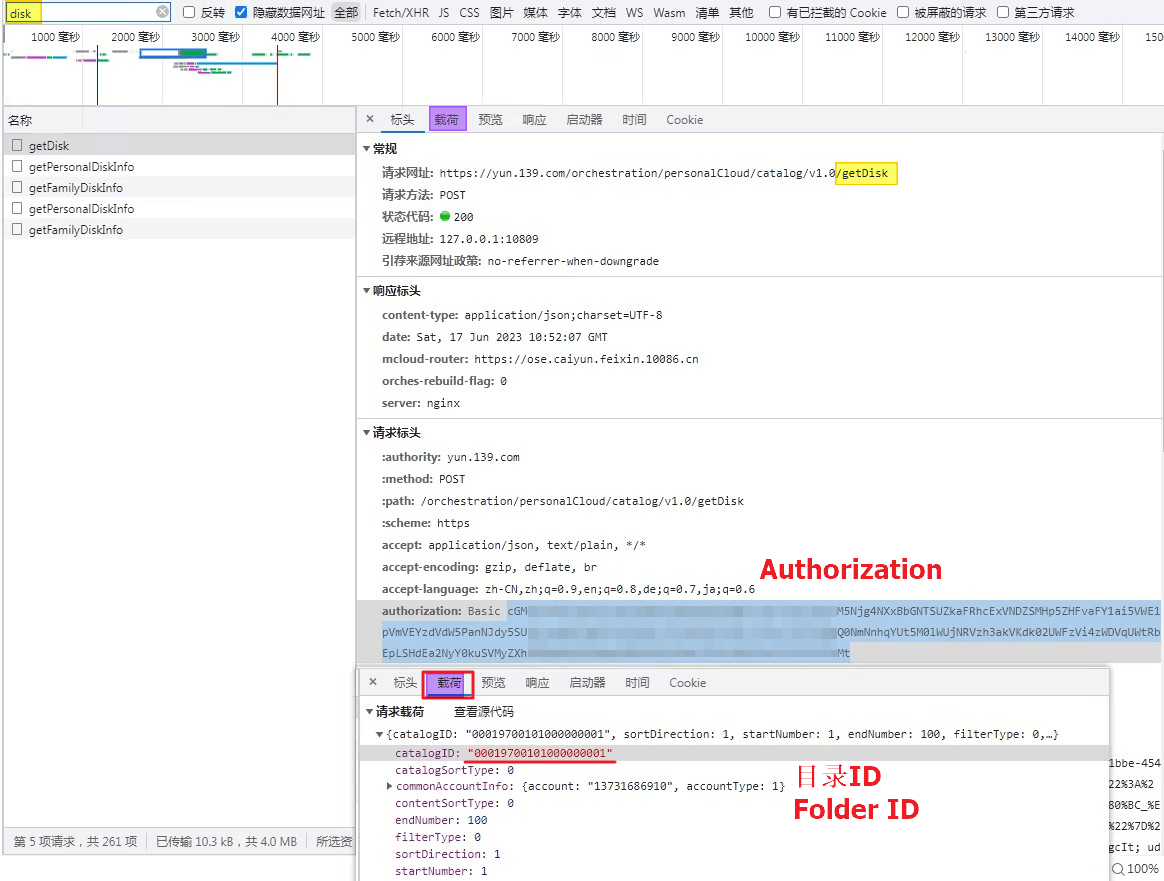
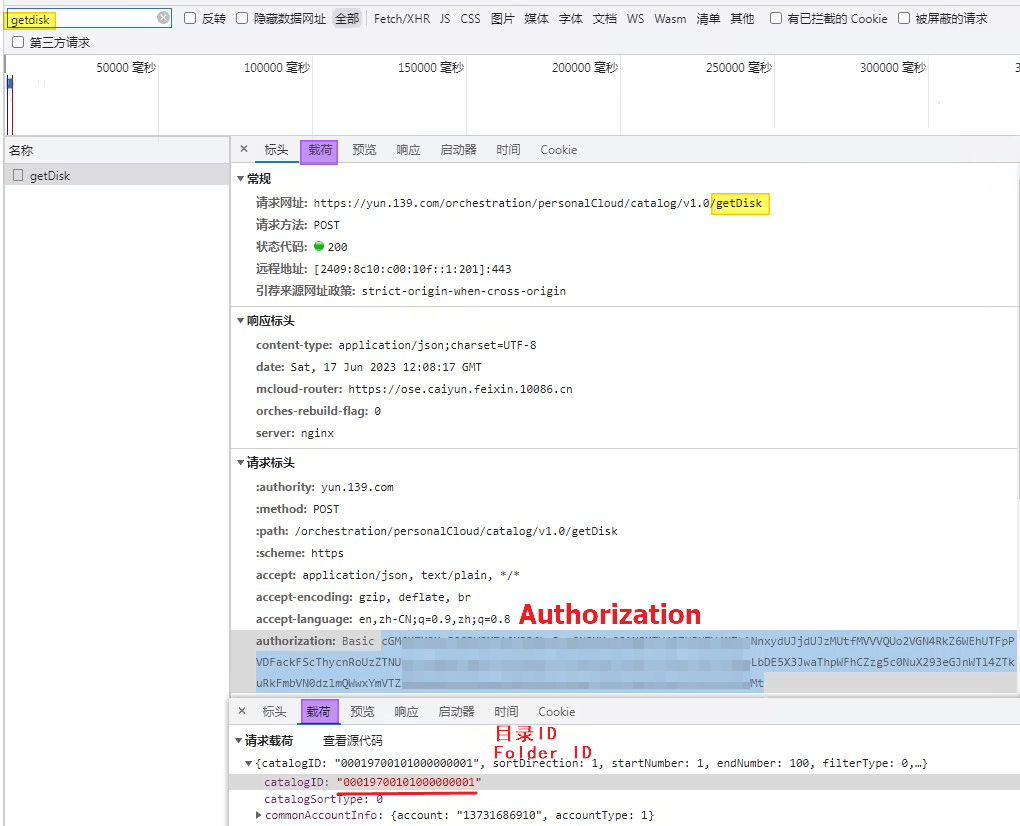
| Legacy personal folder ID | getDisk request or response | catalogID |
UserDomainID | Browser cookies | ud_id |
| Share link ID | Share page URL on yun.139.com | The path segment after /share/ in the sharing URL |
In Firefox, cookies and local storage can be easier to find in DevTools -> Storage.
使用浏览器开发者工具查找以下字段。
| 需要获取 | 查找位置 | 字段 |
|---|---|---|
Authorization | yun.139.com 的网络请求标头 | Authorization: Basic ...;只复制 Basic 后面的值 |
| 新的个人盘文件夹 ID | hcy/file/list 请求,或浏览器存储 | parentFileId 或 currentCatalogID |
| 家庭云 ID | queryContentList 请求载荷 | cloudID |
| 家庭云文件夹 ID | queryContentList 响应 | data.path;手动填写时去掉 root:/ 或 root: |
| 共享群 ID | queryGroupContentList 请求载荷 | groupID |
| 共享群文件夹 ID | queryGroupContentList 请求载荷或响应 | path 或文件夹 ID |
| 旧个人云文件夹 ID | getDisk 请求或响应 | catalogID |
UserDomainID | 浏览器 Cookie | ud_id |
| 分享链接 ID | yun.139.com 分享页面 URL | 分享链接 /share/ 后的路径段 |
Firefox 中可以在开发者工具 -> 存储中查看 Cookie 和本地存储,通常更容易找到 Authorization、ud_id 和 currentCatalogID。
Personal new
新的个人盘
Choose one of the following methods to find Authorization and folder ID.
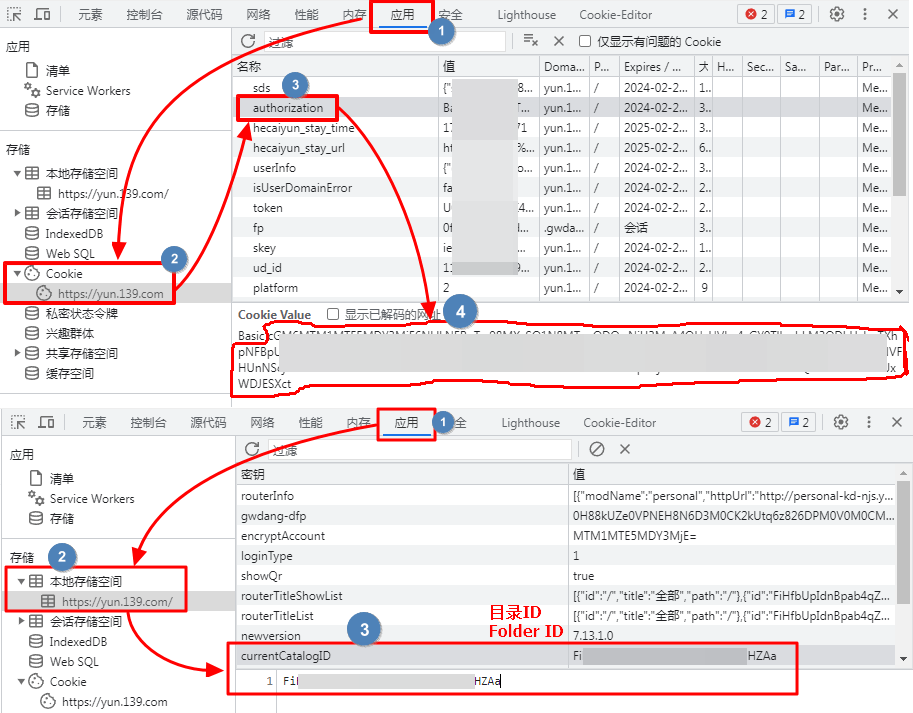
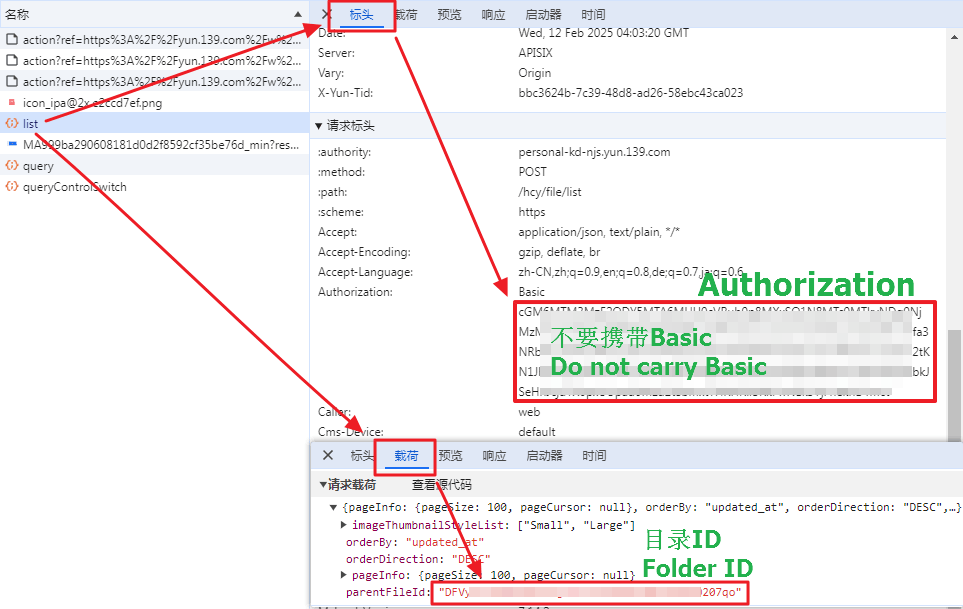
If you want the folder ID of a subfolder, enter that subfolder first and then inspect the new request or storage value. Otherwise, the old folder ID may still be displayed.
以下方法可用于查找 “授权” 和文件夹 ID。
如果要查看子文件夹 ID,请先进入该子文件夹,再查看新的请求或存储值,否则看到的可能仍是之前的文件夹 ID。
Personal cloud
个人云
Family cloud
家庭云
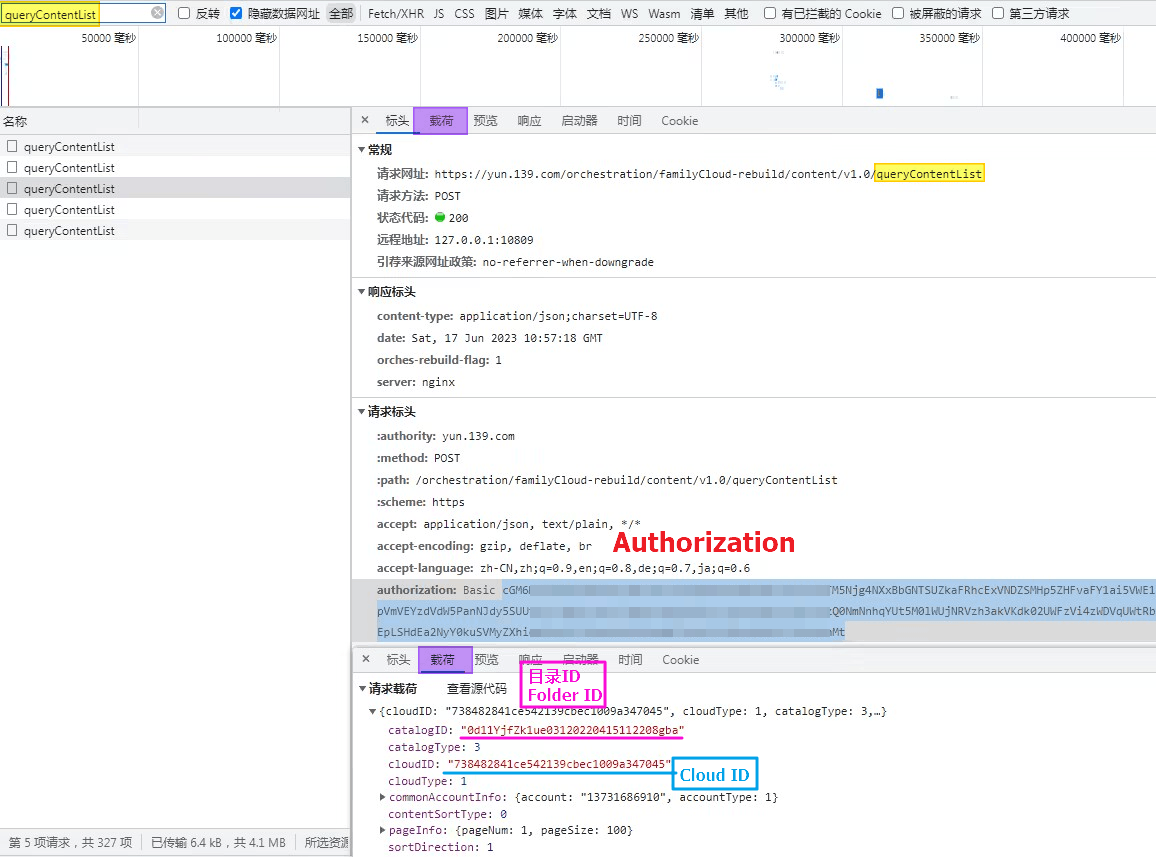
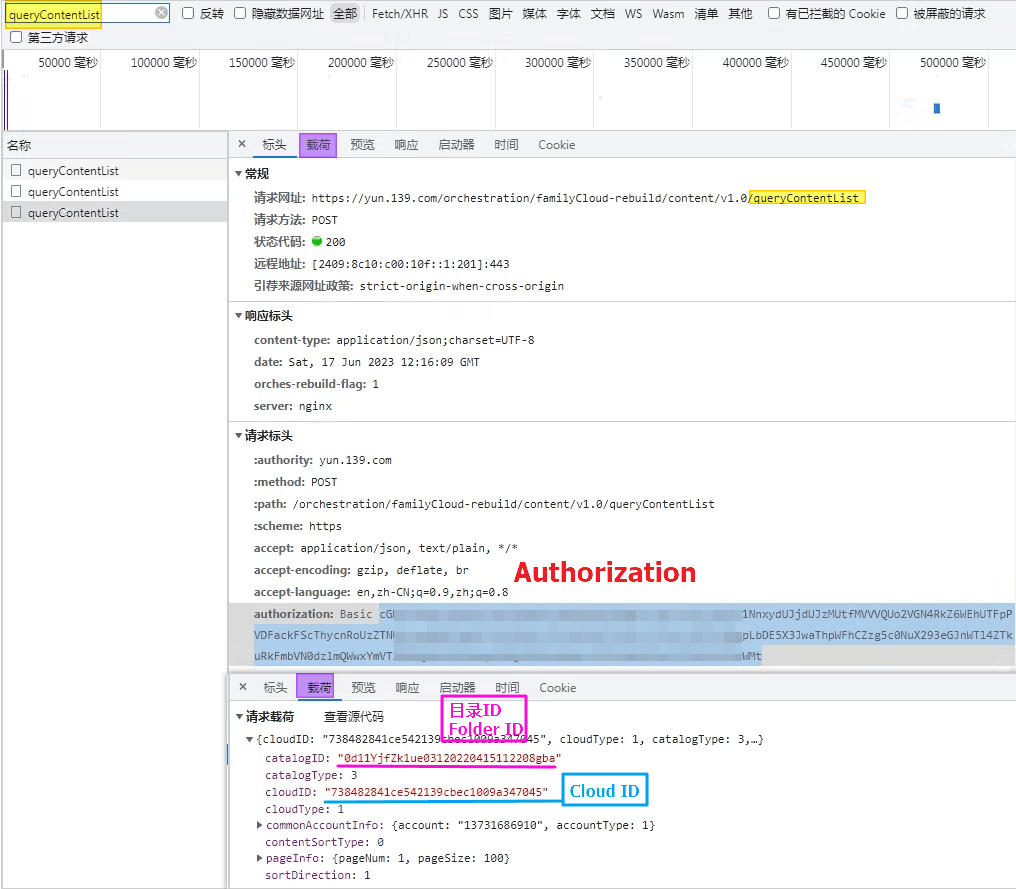
Teaching video
Although the video is for V2, the method for obtaining folder ID and Cloud ID is still similar.
OpenList fill in examples
OpenList 挂载填写示例
Authorization: fill in only the content afterBasic.- New personal folder ID: enter the target folder first, then use the current
currentCatalogID.
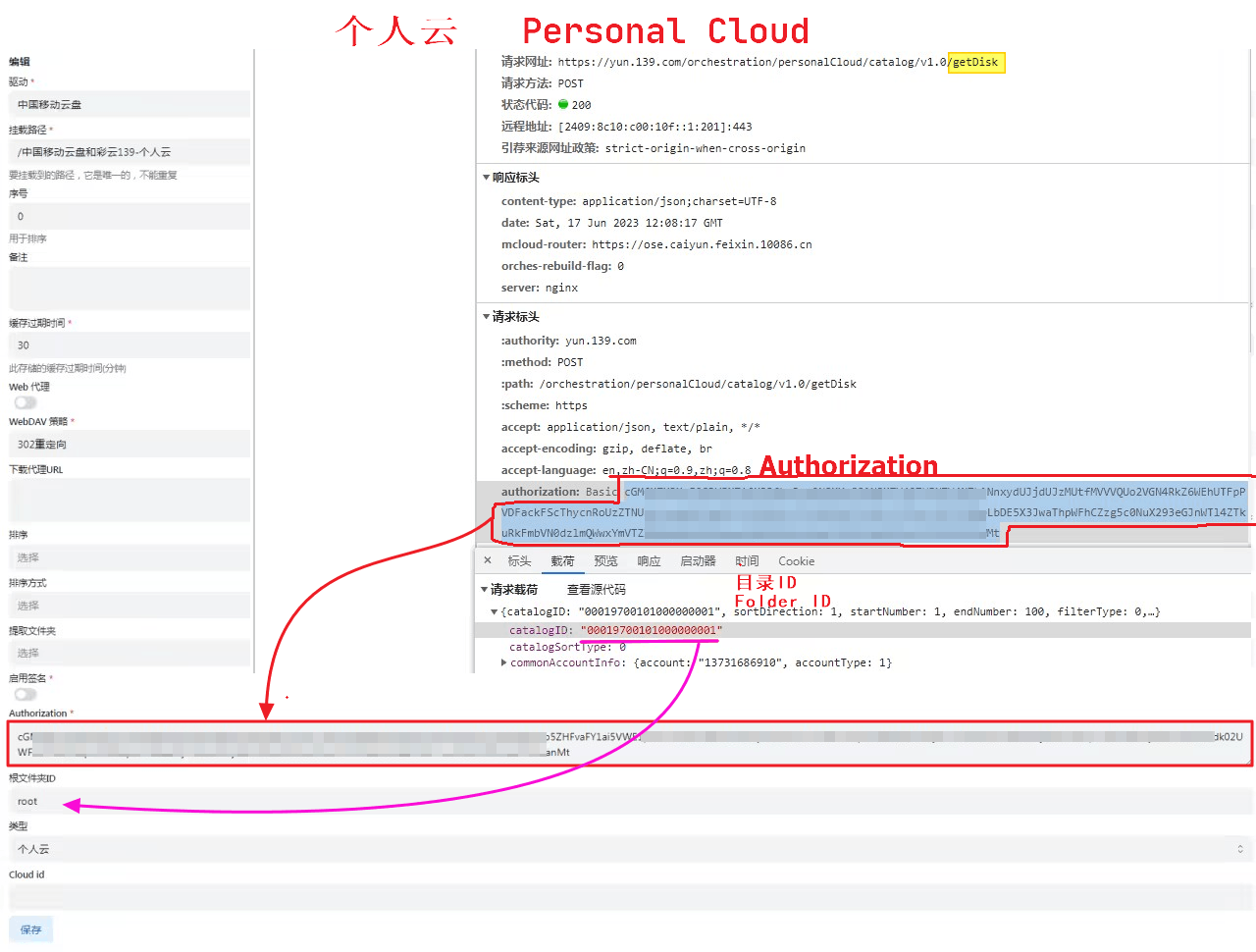
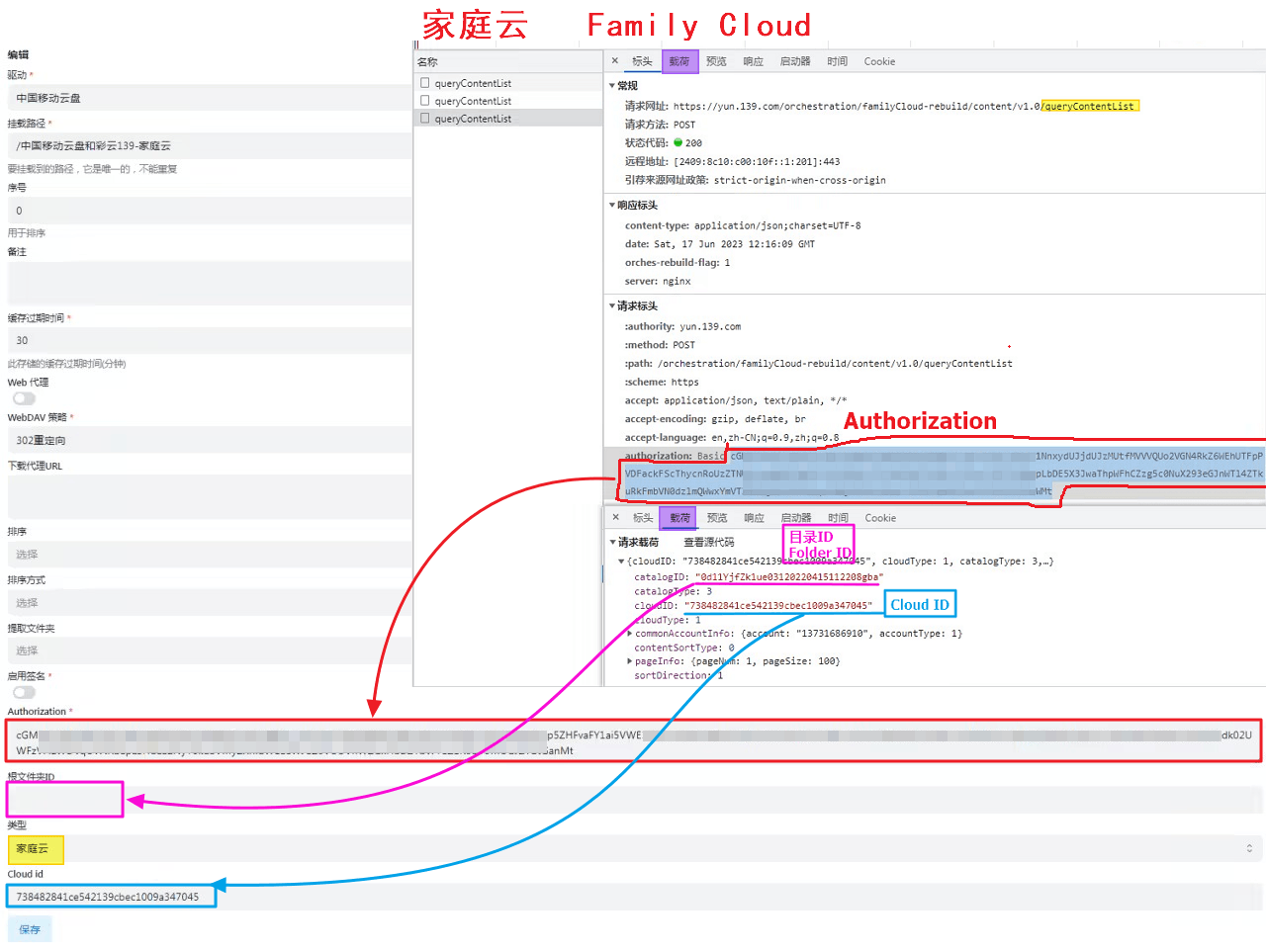
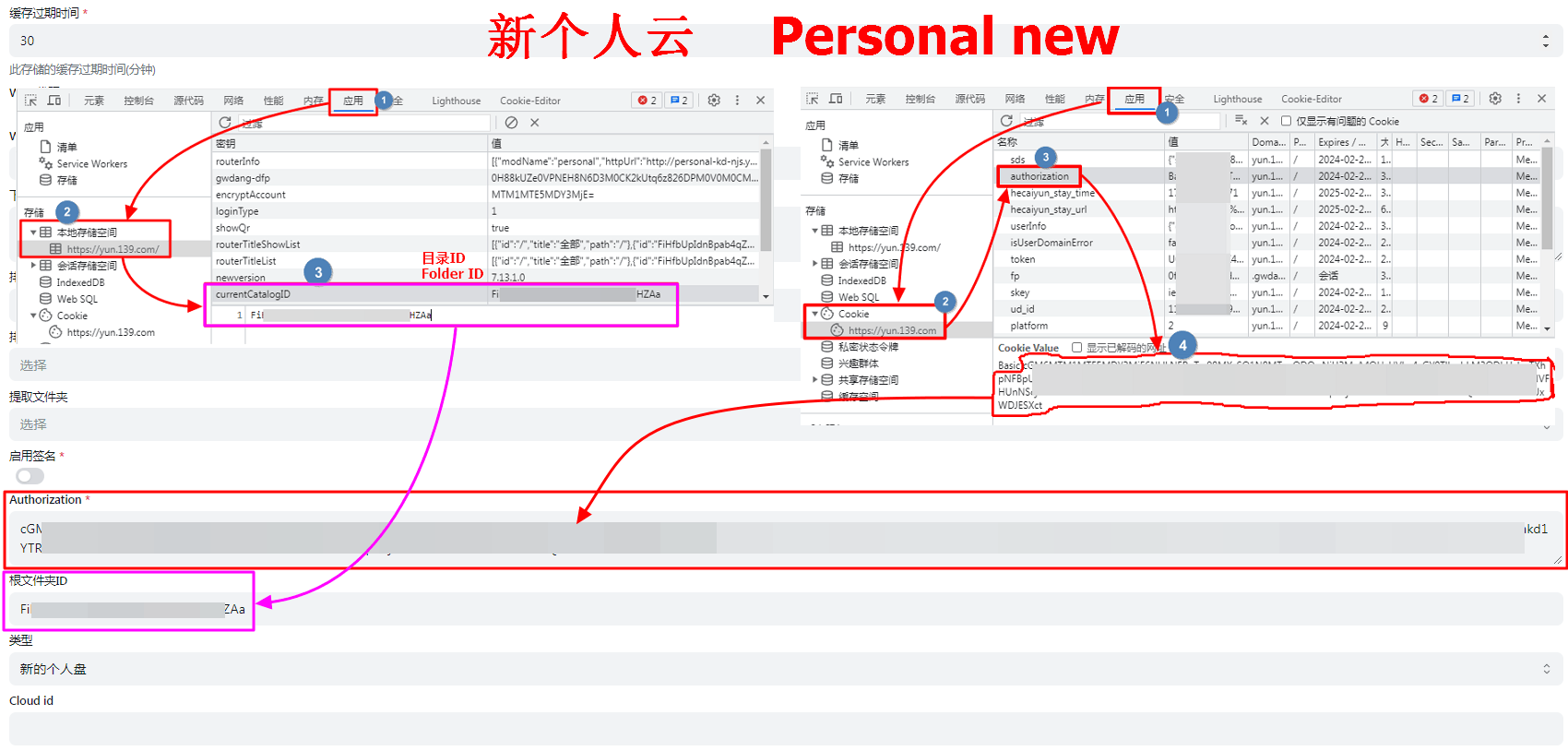
- “授权”:只填写
Basic后面的内容。 - 新的个人盘文件夹 ID:先进入目标文件夹,再使用当前的
currentCatalogID。
Share mount
分享挂载
The share type allows you to mount shared content from other 139Yun users. You need a valid authorization to access download APIs.
share(分享挂载)类型允许你挂载其他移动云盘用户分享的内容。访问下载接口仍需要有效的鉴权。
LinkID format
LinkID 格式
LinkID supports the following formats:
- Single share: directly enter the share link ID
- Password-protected share:
link_id#password - Multiple shares: separate multiple entries with commas or new lines. For example:
share_a,share_b,share_corshare_a#pass1,share_b
LinkID(分享链接 ID)支持以下格式:
- 单个分享:直接填写分享链接 ID
- 加密分享:
link_id#password(链接 ID 后加#和密码) - 多个分享:多个分享用逗号或换行分隔,例如:
share_a,share_b,share_c或share_a#密码1,share_b
Get share link ID
获取分享链接 ID
- Open the share link in your browser, e.g.
https://yun.139.com/w/#/share/xxxxx - The path segment after
/share/is the share link ID (e.g.xxxxx) - If the share is password-protected, append
#passwordafter the link ID
- 在浏览器中打开分享链接,例如
https://yun.139.com/w/#/share/xxxxx - 链接中
/share/后面的路径段就是分享链接 ID(如上例中的xxxxx) - 如果分享有密码保护,在链接 ID 后加
#密码
Configuration
配置说明
- Type:
share - LinkID: one or more share link IDs (see format above)
- Authorization or MailCookies + Username + Password: required for authentication (same as other types)
- Root folder ID: not used for share type. The share link ID in
LinkIDdetermines the mounted content. - Cloud ID: leave empty
Notes:
- Upload operations are not supported for the
sharetype. - When mounting multiple shares, the root directory shows each share as a separate folder.
${data_path}resolves to the share root for path-based operations.
- 类型:
share(分享挂载) - LinkID:一个或多个分享链接 ID(格式见上方)
- 授权 或 邮箱 Cookie + 用户名 + 密码:需要填写以完成鉴权(与其他类型相同)
- 根文件夹 ID:分享挂载不使用此字段,挂载内容由
LinkID决定 - Cloud ID:留空
注意事项:
- 分享挂载类型不支持上传操作。
- 挂载多个分享时,根目录会以文件夹形式展示每个分享的内容。
- path 相关操作会以分享根目录作为
${data_path}。
Download method
下载方式
The default download method is 302 redirection. If a player such as PotPlayer cannot play through 302, switch that mount to proxy mode or mount it through WebDAV with WebDAV Native Proxy.
默认下载方式是 302 跳转。如果 PotPlayer 等播放器无法通过 302 播放,可以将该挂载切换为代理模式,或通过启用 WebDAV 本地代理 的 WebDAV 挂载播放。